

A shoutout to my dad who wanted me to download some ~2000 n8n scripts from a copy-protected file. Instead, he’s getting a do-it-yourself-with-n8n instruction - giving a rod, not fish.
While making this video, I came across some other zero-code automation tools. One of them is windmill that allows you to chain many scripts from different programming languages in a sort of “application”. Pretty useful, thinking that the most typical coding nowadays is of vibe type. As I write about the importance of teaching system design principles and how to vibe code a good software architecture, some people think about abstracting that as well.
Speckle on the other hand is a more niche variant of these automation / software connection tools. They have created an internal way of defining geometry that is used for file transmission and geometry operations between BIM software and formats. Speckle is a good option in some usecases, but there are some file conversions it doesn’t cover. Writing a custom script in n8n or windmill and connecting them to Revit / Rhino / ArchiCAD / whatever with a webhook and an http request is relatively straightforward.
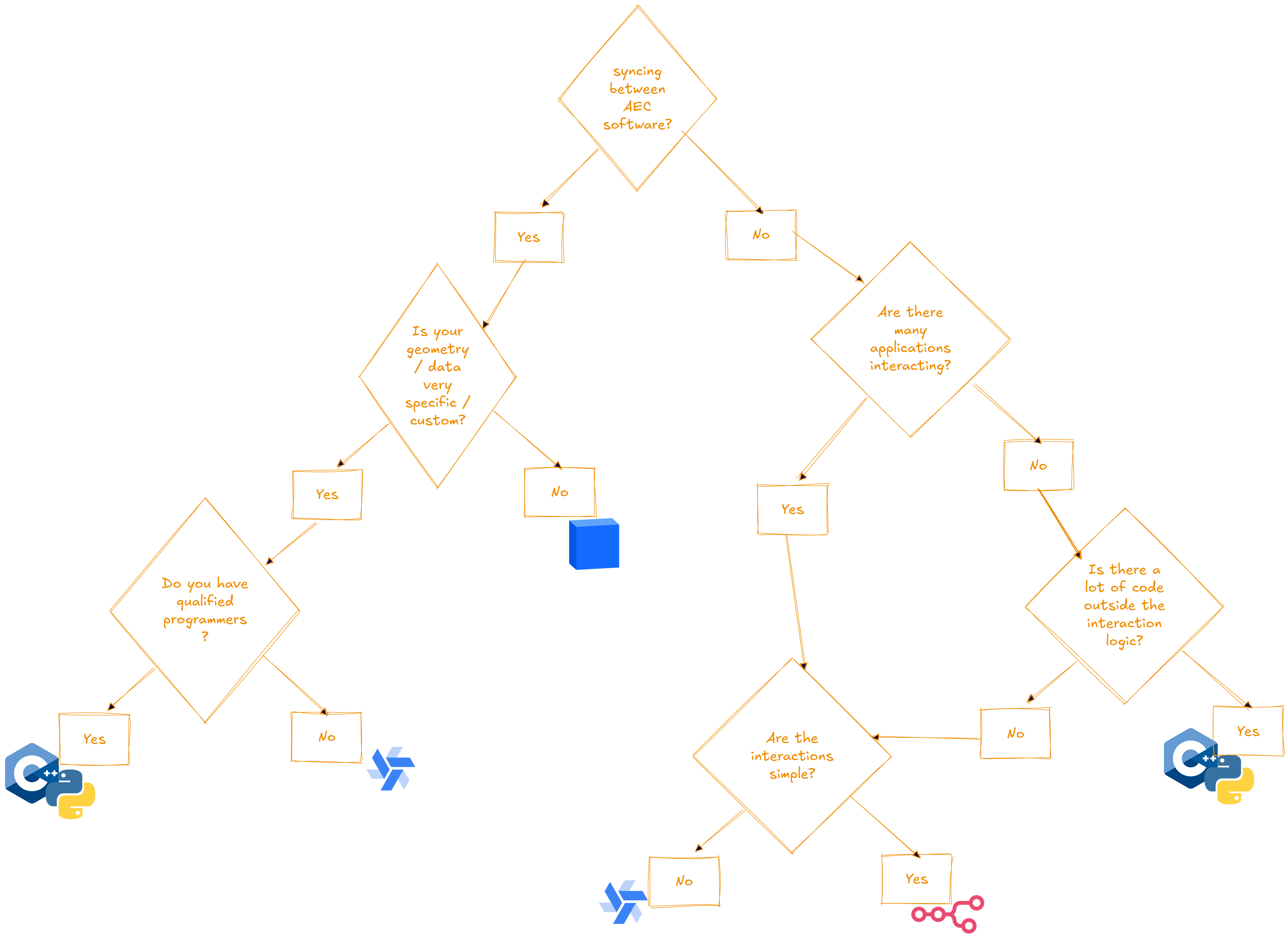
So when use what? Should one use windmill or n8n or speckle or go pure code? All of these options cost more or less same (baseline is free), but based on the usecases the reasoning can differ.
Surviving the competition
All these software manage to coexist because they have a separate niche in app connection ecosystem. Speckle is a very niche AEC-focused solution oriented at a small slice of architects daring to install new software script. n8n targets people with basic automation needs prioritizing comfort over customizability. Windmill took an alternative path prioritizing customizability a bit more while still keeping decent comfort level.
Coding offers most flexibility and control but it also requires quite some effort both in creating and maintaining the application.
AEC-related usecases
and converting receipts images into accounting records will be coming in the next posts.
Step-by-step written
For those who prefer written instructions to the video ones:
Create an n8n instance or open an existing one
Make a GoogleSheets node
Insert the link to the file in the node field
Create Google credentials
Test the connection and make sure credentials work
Add Google Drive node (Download files) reusing the credentials from step 4
Add Google Drive node (Upload files) reusing the credentials from step 4
Run the workflow:)
OBS: Test with a few files first, it would be easier to debug.
Special thanks for music in the video:
Song: Clarx & Shiah Maisel - Gotta Leave [NCS Release]
Music provided by NoCopyrightSounds
Free Download/Stream: http://ncs.io/GottaLeave
Watch: http://ncs.lnk.to/GottaLeaveAT/youtube

